When が ≠ が: Debugging a Unicode normalization bug in production
This week I encountered an interesting issue in production. Our product has an image upload feature where users can upload files and later search for them by filename. Sounds simple enough.
However, we received a customer inquiry saying they couldn’t find an image they had just uploaded using the search box.
After a short investigation, we discovered the root cause:
- The uploaded file name used a combining character sequence (結合文字列)
- The search input used a precomposed character (合成済み文字)
Visually identical. Internally different. And that broke our search.
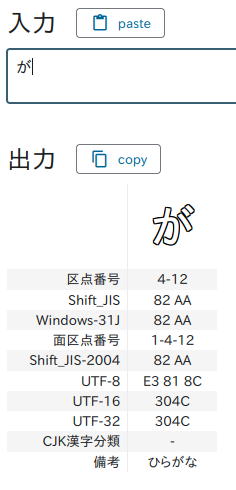
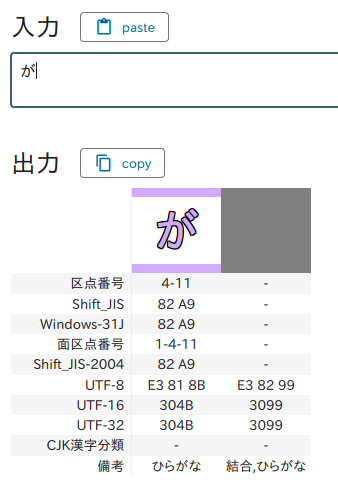 Yes, they are different characters.
So what are combining characters and precomposed characters?
Precomposed character (合成済み文字)
Wikipedia: English and Japanese
A precomposed character is a single Unicode code point that represents a complete character. Example: が (U+304C) This is a single code point, even though it conceptually consists of:
- base character: か
- diacritic: ゛
Combining character sequence (結合文字列)
Wikipedia: English and Japanese
A combining character sequence is made up of:
- a base character (基底文字)
- followed by one or more combining characters (結合文字)
Example: が = か (U+304B) and ゛(U+3099) Visually, this looks exactly like “が”, but internally it’s two code points instead of one.
How this affected our system
In our case, we retrieve file names from S3 and compare them with user input using in_array() in PHP.
Here’s a simplified example:
|
|
Result:
|
|
Let’s look at the actual byte representation:
|
|
Output:
|
|
Even though they look identical, the binary representations are different, so the comparison fails.
How to reproduce
Unicode normalization (NFC vs NFD) can vary depending on:
- Operating system (macOS, Windows, Linux)
- Input method
- File upload source
Normally, typing “が” gives you the precomposed character.
To manually input a combining sequence with fcitx:
- input か normally
- Switch to Romaji mode (I cannot input unicode when input mode is hiragana, probably just my problem)
- Turn on Unicode mode by pressing Ctrl + Shift + U
- type 3099 then space
This will give you a precomposed が.
You can do the same thing on windows using Unicode input mode.
How to fix
The solution is to normalize both strings before comparison. In PHP, you can use normalizer_normalize:
|
|
Output:
|
|
Lessons learned
- Always normalize before comparing strings
- Normalize at input boundaries (storing filenames, database insertion etc)
- Choose a standard form (usually NFC)
Bonus: Test data
If you want to test combining characters quickly without manually typing them using unicode:
|
|